Lend & borrow · Map tracking · Due date reminders · iOS
Where is it again?
A small place to remember what you've lent and borrowed. Books, tools, cash. Know who has what when you need it back.

Lend & borrow · Map tracking · Due date reminders · iOS
A small place to remember what you've lent and borrowed. Books, tools, cash. Know who has what when you need it back.
THE IDEA
No accounts, no cloud, no subscriptions. Everything is stored locally — nothing ever leaves your device.
Drop a pin on the map where a loan lives. See at a glance where all your things are and who has them.
Get a nudge a few days before something is due and once when it's overdue. That's it — no noise.
HOW IT WORKS
Go to Settings → Edit your locations. Add the places where things tend to end up — a friend's name, a room, anywhere.
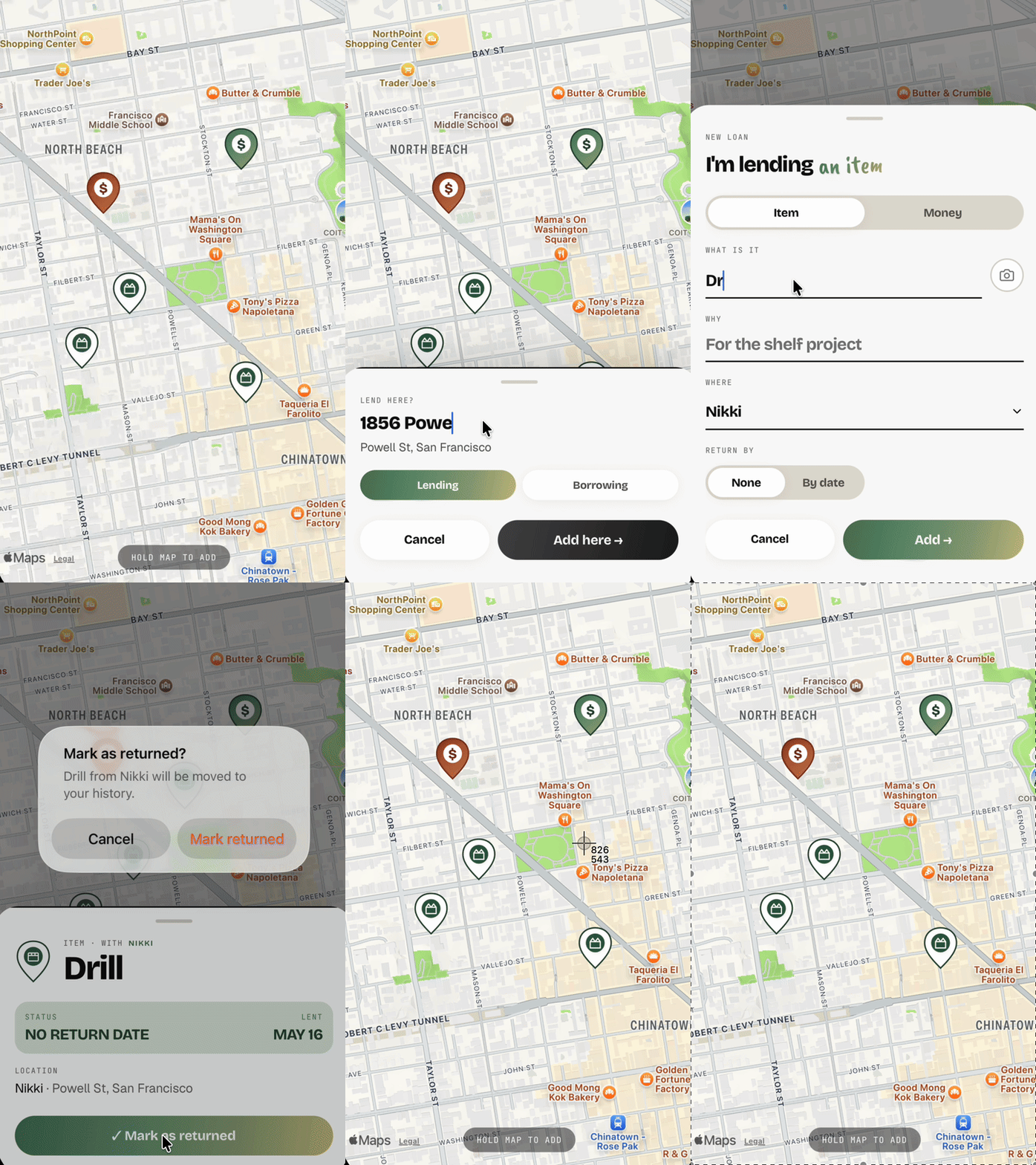
Long-press anywhere on the map. Choose whether you're lending or borrowing, then confirm to open the log form.
Pick item or money, enter what it is, who it's with, which location, and an optional due date. Tap Save.
Open the ledger (top-left button) to see everything at a glance — items out, money owed, sorted by due date.
When something comes back, tap the loan card and mark it returned. It moves to history so your ledger stays clean.
Enable reminders in Settings. You'll get a nudge a few days before the due date and once when something is overdue.